Bambu Lab A1 vs Bambu Lab P1S
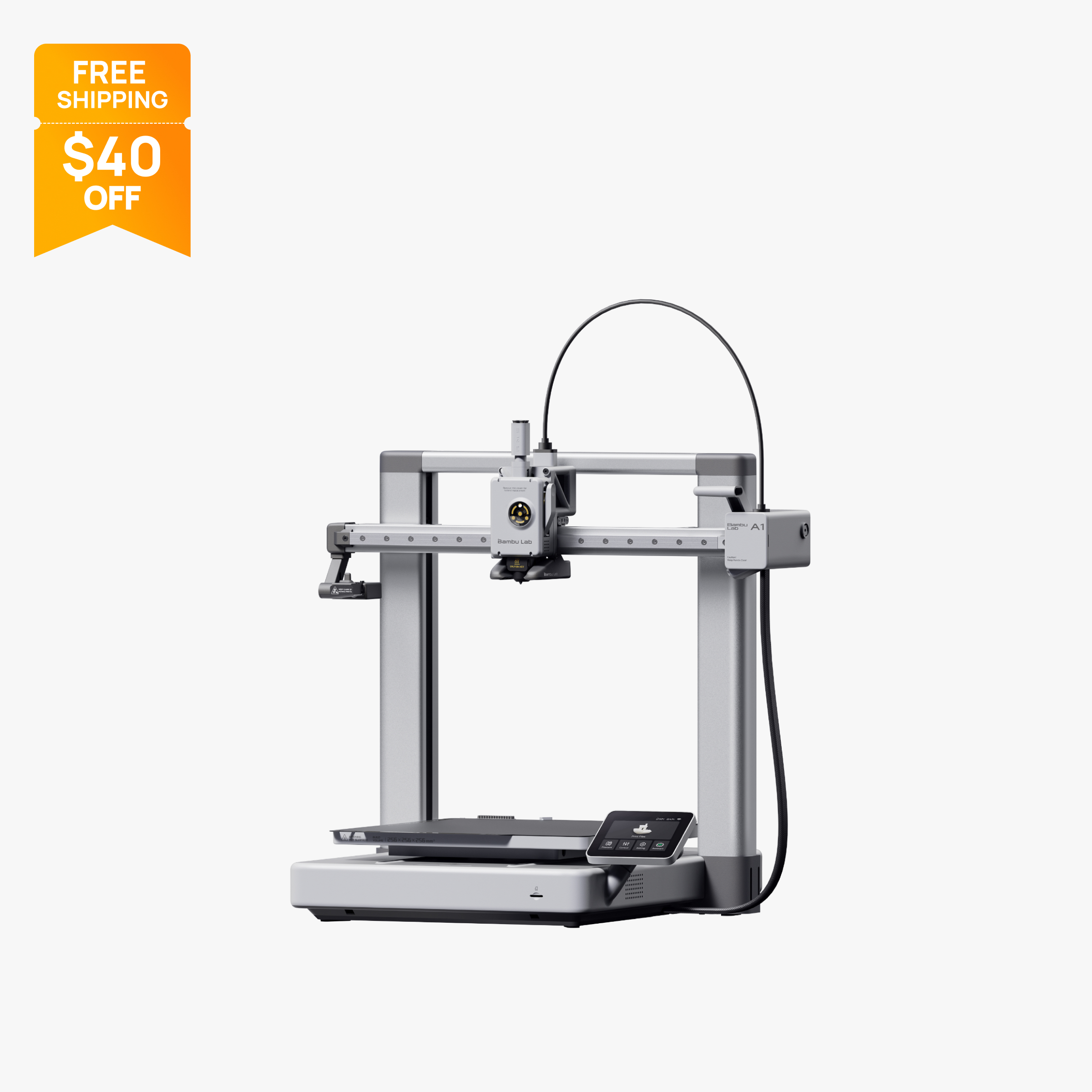
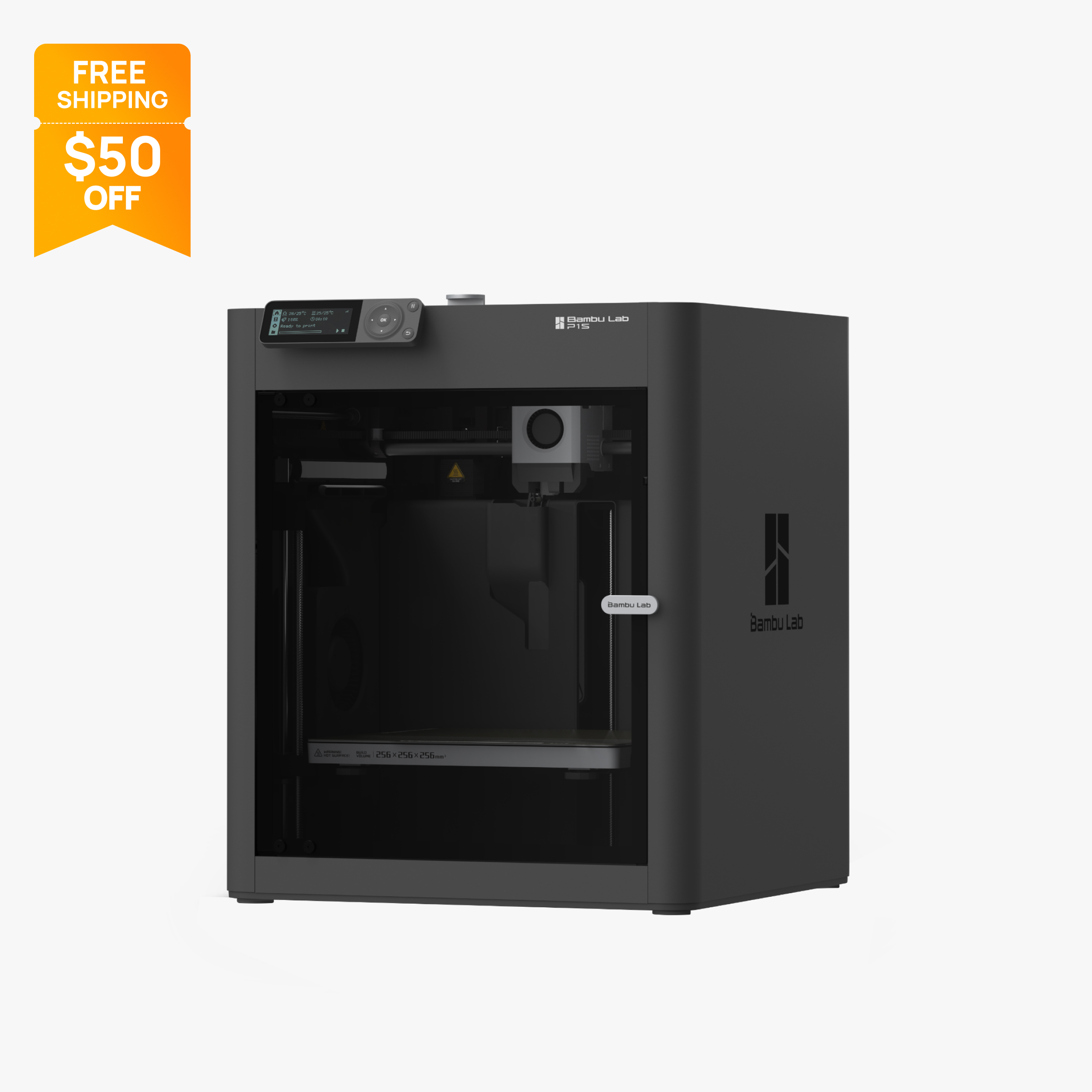
Verdict
Buy the A1 if you mostly print PLA, PETG and TPU and want the lowest price and a larger screen. Buy the P1S if you want an enclosed printer with a carbon filter for ABS and ASA, 20,000 mm/s² acceleration, or room to grow to as many as 16 colors with several AMS units. Both have a 256 mm cube build volume.
Specs side by side
| Spec | Bambu Lab A1 | Bambu Lab P1S |
|---|---|---|
| Type | FDM | FDM |
| Price | $259 | $349 |
| Build volume | 256×256×256 mm | 256×256×256 mm |
| Max speed | 500 mm/s | 500 mm/s |
| Multicolor | Yes (AMS Lite (optional, one unit, up to 4 colors)) | Yes (AMS or AMS 2 Pro (optional, up to 16 colors with 4 units)) |
| Enclosed | No | Yes |
| Auto bed leveling | Yes | Yes |
| Connectivity | Wi-Fi, Bambu-Bus, microSD | Wi-Fi, Bluetooth, Bambu-Bus, microSD |
| Noise | 49 dB | 48 dB |
| Release year | 2023 | 2023 |
Quick answer
Pick the Bambu Lab A1 if you print mostly PLA, PETG and TPU, want the lowest price, and value an open-frame machine that is easy to reach into. Pick the Bambu Lab P1S if you want an enclosed printer with a carbon filter for ABS and ASA, faster acceleration, or room to grow to as many as 16 colors with multiple AMS units. Both have the same 256 x 256 x 256 mm build volume, 500 mm/s top speed and 300 °C hot end, and both run Bambu Studio. The decision comes down to the enclosure and how much multicolor you expect to do.
Key differences
Open frame versus enclosed
This is the central tradeoff. The A1 is an open-frame bed slinger, and the P1S is a fully enclosed CoreXY machine with an activated carbon filter. The enclosure keeps drafts off the print, and the carbon filter gives the P1S a way to treat chamber air, which matters more with materials like ABS and ASA.
Bambu's material ratings show how much that matters. The A1 lists ABS, ASA, PC and PA as not recommended, and Bambu's FAQ says those filaments may work for small, low-infill parts but that the open frame raises the risk of warping and weak layer bonding on larger prints. Bambu also says it does not recommend enclosing the A1. On the P1S, Bambu lists ABS and ASA as ideal, while PA and PC are rated only as capable because the chamber is not actively heated.
If you only plan to print PLA, PETG and TPU, the open frame is not a handicap, and it makes it easier to remove prints and swap filament. If there is any chance you will want ABS or ASA for outdoor or heat-exposed parts, the P1S saves you from buying a second printer later. See best enclosed 3D printers for other options in that category.
Motion system and acceleration
The A1 uses a bed slinger design, where the bed moves back and forth along one axis. The P1S uses CoreXY, where the print head moves in X and Y and the bed moves only up and down. Bambu lists the same 500 mm/s top speed for both, but acceleration differs: 10,000 mm/s² on the A1 and 20,000 mm/s² on the P1S.
Acceleration is how quickly the printer reaches speed and changes direction, and most real parts are full of short moves and corners, so it often matters more than top speed. A CoreXY machine with higher acceleration can keep print times shorter on typical parts. These are manufacturer ratings, so treat them as a direction, not a guarantee of finished print time.
The A1 also needs extra clearance front to back beyond its 465 x 410 x 430 mm frame because of that bed travel, a consideration if your shelf is tight.
Multicolor capacity
Both printers can print in multiple colors, but with different ceilings. The A1 supports one AMS Lite unit, so multicolor stops at 4 filaments per job. Bambu's FAQ also says connecting a full AMS, AMS 2 Pro or AMS HT to the A1 requires the separate AMS HUB accessory. The P1S supports the standard AMS and AMS 2 Pro, and Bambu says up to four units can be connected for as many as 16 colors or materials in a single print.
The P1S also has a drying option. Bambu sells a P1S AMS 2 Pro Combo that adds active filament drying to the multicolor setup, which is worth considering if you print humidity-sensitive filaments.
If 4 colors is plenty, the A1 Combo is a cheaper path. If your plans include many-color models, gradients across several spools, or mixing support material with colored filament, the P1S is the platform with more headroom. Our best multicolor 3D printers page compares other multicolor systems.
Screen, camera and connectivity
The A1 has a 3.5-inch screen, and the P1S has a 2.7-inch button-driven screen, so the A1 is the easier machine to operate directly. Most P1S control happens through the app or slicer.
On the sensor side, Bambu lists a timelapse camera among the A1's included features. The P1S has a chamber camera that records at 0.5 fps, which suits timelapse but not smooth live monitoring.
Connectivity is close. The A1 lists Wi-Fi, Bambu-Bus and microSD. The P1S lists the same plus Bluetooth. Both work with Bambu Studio and, per Bambu, with third-party slicers that export standard G-code, such as PrusaSlicer, SuperSlicer and Cura, though some advanced features may not be available outside Bambu's own software. The A1 also offers a LAN-only mode.
Noise
Bambu's US store lists A1 operation as low as 49 dB, with active motor noise canceling. That is the lowest figure on the listing, not a typical or maximum level. This page has no verified noise figure for the P1S, so it cannot say which printer is quieter, so check Bambu's spec page before making noise a deciding factor.
If you will run either printer in a bedroom or a shared room, compare Bambu's published figures for both models before buying, and plan to keep the printer on a stable surface.
Nozzle and upgrade path
Both printers ship with a stainless steel nozzle. Bambu says fiber-reinforced filaments such as carbon fiber are not recommended on the P1S until the extruder and hot end are upgraded, and on the A1 the stock nozzle must be swapped for hardened steel before printing abrasive filaments. So neither is a carbon fiber printer out of the box.
If hardened-steel hardware out of the box matters, Bambu's newer P2S ships with a hardened steel nozzle, a 110 °C bed and a 5-inch touchscreen, at 600 mm/s, per its official specs. See the price section for how it is priced next to the P1S.
Build volume and what fits
There is no difference here on paper: both printers list a 256 x 256 x 256 mm build volume, which is large for this price range and enough for full-size helmets, big organizers and large functional parts in one piece. The practical differences are small. The P1S defaults to a 250 mm printable height in Bambu Studio to protect the heatbed, and using the full 256 mm needs extra steps from Bambu's wiki. On the A1, plan for clearance around the frame because the bed moves.
Because the volume is identical, build size should not decide between these two. If you want a bigger bed, you have to step up to a different class of printer; our best large-format 3D printers page lists those.
Setup, safety history and ecosystem
Both printers run Bambu's automatic calibration and use the same slicer, app and filament ecosystem, so learning one carries over to the other. Bambu's wiki and store FAQs cover setup for each model.
One item specific to the A1 is its recall history. Bambu's US store FAQ refers to a January 2024 recall tied to a heatbed cable issue. It states that A1 printers sold after January 30, 2024 are not from the recalled batch and include the fixes, and the current listing mentions an upgraded, Kevlar-reinforced heatbed cable. Units bought new today fall in the fixed group, but if you are considering a used A1, ask the seller when it was bought. The P1S is still sold, and Bambu has not announced an end of life for it.
Price and what you get
At the time of writing (October 2026), Bambu's US store lists the A1 at $259 on sale (regular $299) and the A1 Combo, which includes one AMS Lite, at $359 (regular $399). The P1S is $349 on sale (regular $399), the P1S AMS Combo is $479 and the P1S AMS 2 Pro Combo is $509.
For the exact same bed size, the P1S printer alone costs more than the A1 alone, and the gap grows once you include a multicolor system. What you are paying for is the enclosure, carbon filter, higher acceleration and the ability to expand to 16 colors. Bambu also sells the newer P2S at $449 on sale (regular $549), and it is not an official replacement for the P1S, which remains listed and in stock.
One practical note on the P1S: Bambu Studio defaults the printable height to 250 mm to protect the heatbed, and using the full 256 mm requires following a wiki procedure.
Who should buy which
Buy the A1 if:
- You print PLA, PETG and TPU and do not need ABS or ASA.
- You want the lowest price, or a 4-color Combo for less.
- You prefer a larger screen and easy access to the bed.
- Your space or budget favors an open-frame design.
Buy the P1S if:
- You want to print ABS or ASA reliably.
- You want an enclosure and a carbon filter in the room.
- You may want more than 4 colors, or active filament drying.
- You want higher acceleration for shorter print times on typical parts.
Also consider
- The Bambu Lab A1 mini if you want a smaller, cheaper open-frame option; see A1 vs A1 mini.
- The Prusa Core One if you want an enclosed printer with a heated chamber; see Prusa Core One vs P1S.
- The Creality K1C, an enclosed CoreXY printer at $499 on sale, if you want a hardened steel nozzle.
For help choosing the right category, read FDM vs resin and our best 3D printers for home use.
Frequently asked questions
What is the difference between the Bambu Lab A1 and P1S?
The A1 is an open-frame bed slinger, while the P1S is an enclosed CoreXY printer with an activated carbon filter. Both have a 256 x 256 x 256 mm build volume and 500 mm/s top speed, but the P1S lists 20,000 mm/s² acceleration against 10,000 mm/s² on the A1.
Can the A1 print ABS like the P1S?
Not well. Bambu lists ABS, ASA, PC and PA as not recommended on the A1, and says the open frame raises the risk of warping on larger prints. Bambu lists ABS and ASA as ideal on the P1S.
How many colors can the A1 and P1S print?
The A1 supports one AMS Lite, so up to 4 colors. The P1S supports the AMS and AMS 2 Pro, and Bambu says up to four units can be connected for as many as 16 colors or materials in one print.
Is the P1S worth the extra cost over the A1?
If you want ABS or ASA, an enclosure or more than 4 colors, yes. At the time of writing (October 2026) the P1S is $349 on sale against $259 for the A1. If you only print PLA, PETG and TPU, the A1 covers most needs for less.
Is the P1S discontinued now that the P2S exists?
No. On Bambu's US store the P1S was listed and in stock in October 2026, and Bambu has not announced an end of life for it. The P2S is sold alongside it as a newer model.
Can I enclose the A1 to match the P1S?
Bambu says it does not recommend enclosing the A1, which is designed as an open bed slinger. If you want stable chamber conditions, buy an enclosed printer instead.
Sources
- Bambu Lab A1 tech specs (official)
- Bambu Lab A1 on the official US store (price, FAQ, recall note)
- Bambu Lab A1 FAQ (official wiki)
- Bambu Lab AMS lite on the official US store (price, compatibility)
- Bambu Lab P1S on the official US store (price, parameters, FAQ)
- Bambu Lab P1S technical specifications PDF (official)
- Bambu Lab P1 series page (official)
- Bambu Lab P2S technical specifications (official)
- Bambu Lab P2S on the official US store (price)
- Bambu Lab US store 3D printer collection (lineup and prices)