Bambu Lab P2S vs Bambu Lab P1S
Verdict
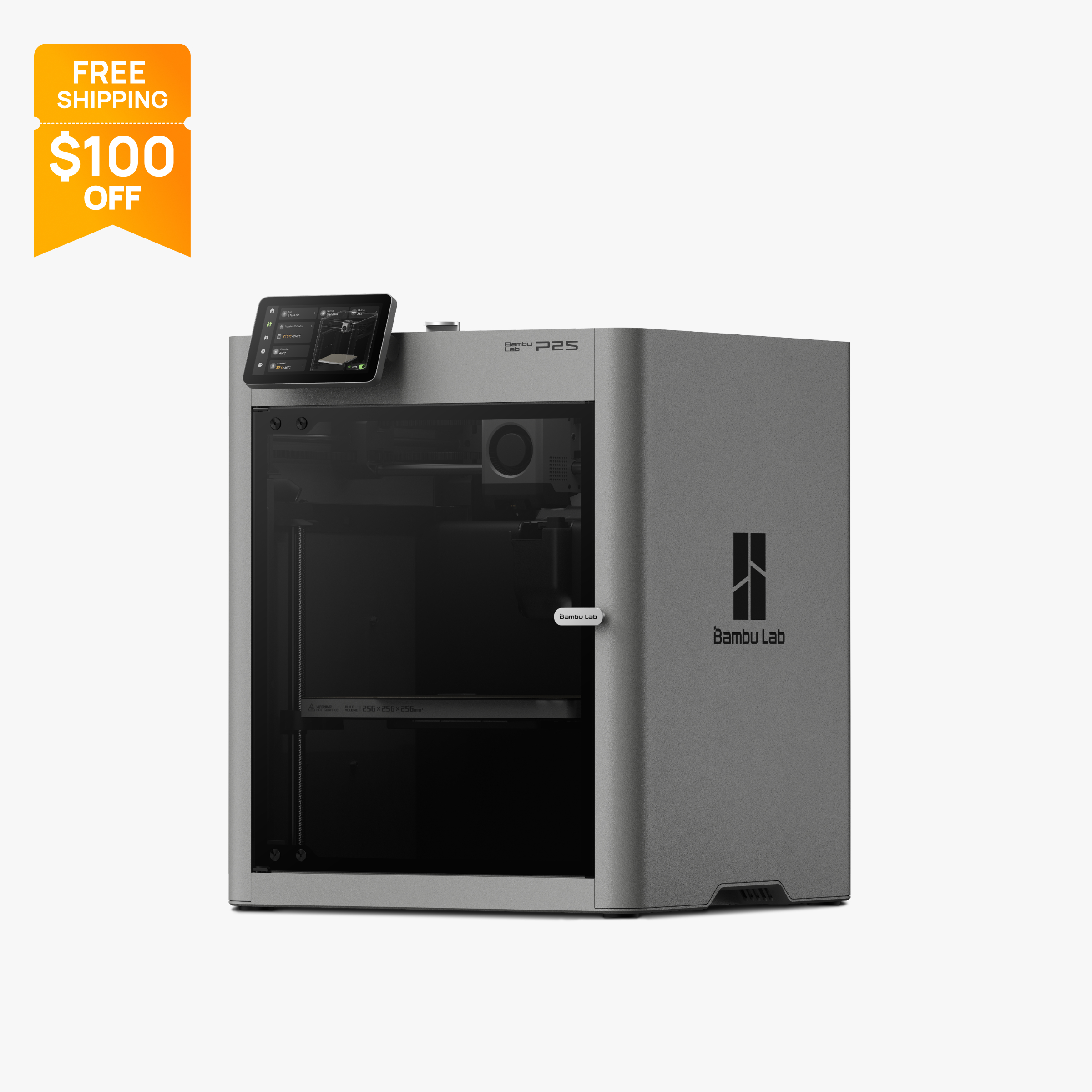
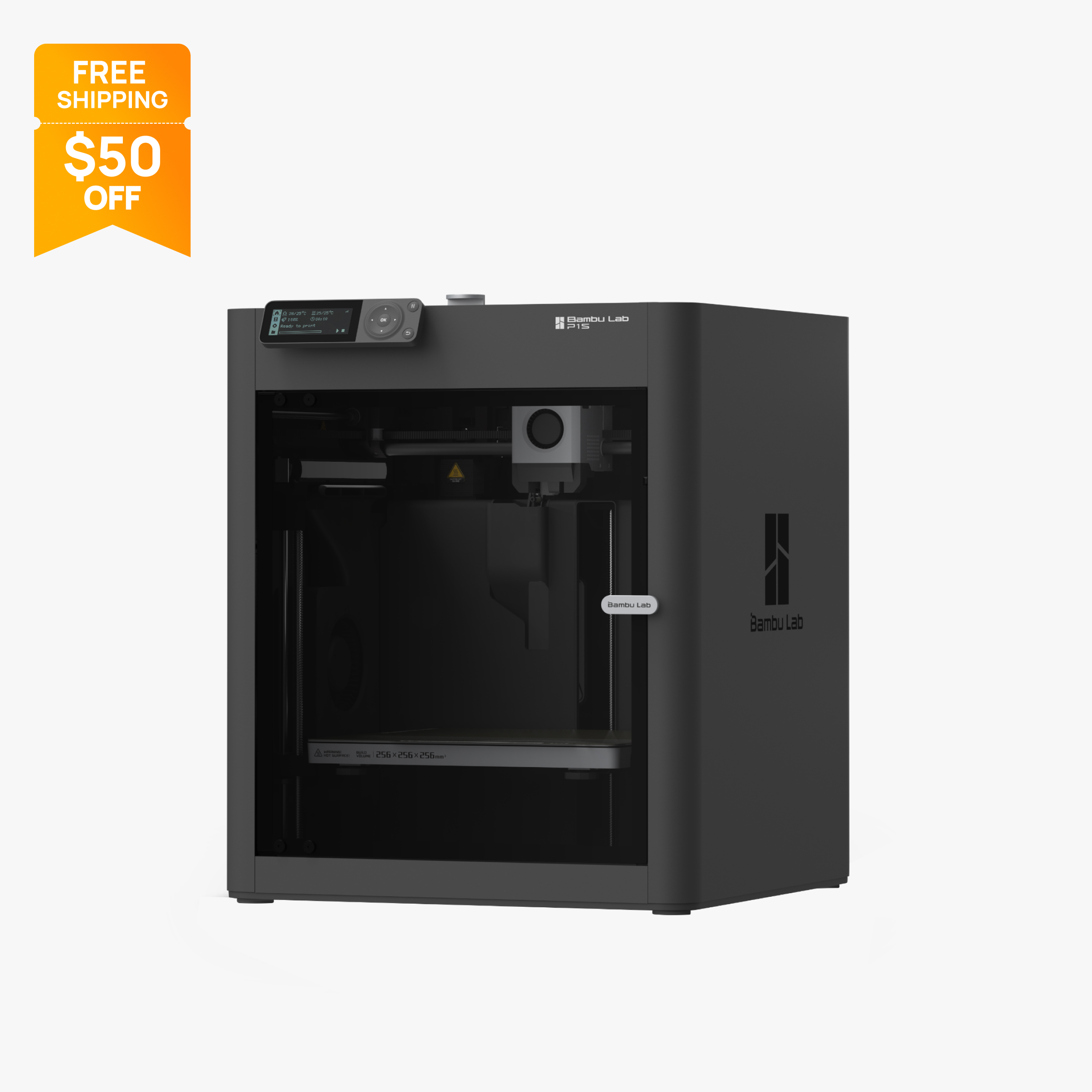
In the P2S vs P1S choice, pick the P1S if you mostly print PLA, PETG, ABS and ASA and want the lowest price for an enclosed Bambu. Pick the P2S if you want carbon fiber filaments without upgrades, a 5-inch touchscreen, a 30 fps camera and a 110 °C bed. Neither has an active chamber heater.
Specs side by side
| Spec | Bambu Lab P2S | Bambu Lab P1S |
|---|---|---|
| Type | FDM | FDM |
| Price | $449 | $349 |
| Build volume | 256×256×256 mm | 256×256×256 mm |
| Max speed | 600 mm/s | 500 mm/s |
| Multicolor | Yes (AMS 2 Pro / AMS HT (optional; AMS 2 Pro included in the P2S Combo; up to 8 units and 20 colors)) | Yes (AMS or AMS 2 Pro (optional, up to 16 colors with 4 units)) |
| Enclosed | Yes | Yes |
| Auto bed leveling | Yes | Yes |
| Connectivity | Dual-band Wi-Fi, USB | Wi-Fi, Bluetooth, Bambu-Bus, microSD |
| Noise | Not listed | 48 dB |
| Release year | Not listed | 2023 |
Quick answer
P2S vs P1S is the main question for anyone shopping Bambu Lab's enclosed printers, because Bambu still sells both. At the time of writing (October 2026), the Bambu Lab P2S is $449 on a Black Friday sale (typical $549) and the Bambu Lab P1S is $349 (typical $399). Pick the P1S if you mainly print PLA, PETG, ABS and ASA and want the cheapest enclosed Bambu. Pick the P2S if you want carbon or glass fiber filaments without upgrading the hot end, a 5-inch touchscreen instead of a 2.7-inch button screen, a smooth 30 fps camera, a 110 °C bed and room for up to 20 colors. Both have the same 256 mm cube build volume, and neither heats its chamber.
Key differences
Nozzle, extruder and fiber-filled filaments
This is the most practical upgrade. The P2S ships with a hardened steel nozzle and hardened steel extruder gear rated to 300 °C, and Bambu's spec sheet lists fiber-filled materials such as PLA-CF, PETG-CF, ABS-GF, PA6-CF and PPA-CF as supported. Its extruder is driven by a permanent magnet synchronous (PMSM) servo motor.
The P1S ships with a stainless steel nozzle. Bambu says carbon and glass fiber filaments are not recommended on it until the extruder and hot end are upgraded, because abrasive fibers wear soft nozzles. Its maximum nozzle temperature is also 300 °C, so the difference is wear resistance, not heat.
The tradeoff is simple. If you never plan to print abrasive filament, the P1S's nozzle is not a limitation for PLA, PETG, ABS, ASA or TPU. If you want stiff, matte CF parts for brackets, jigs or drone frames, the P2S works out of the box, while the P1S needs extra parts and time before it is ready.
The servo extruder is a second, quieter part of this upgrade. Bambu names the PMSM motor on the P2S spec sheet; Bambu's P1S spec data does not describe its extruder motor in the same terms, so the two are not compared directly here. What is clear is that the P2S is ready for abrasive filaments on day one, and the P1S is not.
Screen, camera and on-printer control
The P1S has a 2.7-inch screen driven by buttons, so most control happens in Bambu Studio or the Bambu Handy app. The P2S has a 5-inch, 854 x 480 touchscreen, which makes loading filament, starting files from storage and changing settings at the printer much easier.
Cameras differ a lot. Bambu lists the P1S chamber camera at 1280 x 720 and 0.5 fps, which suits timelapse but looks like a slideshow for live viewing. The P2S camera is 1920 x 1080 at 30 fps, which gives smooth remote monitoring. The P2S spec sheet also lists a 2 TOPS neural processing unit.
If you start long prints and check on them from another room or from work, the P2S camera is a real everyday improvement. If you print short jobs while sitting next to the printer, the screen matters more than the camera, and the P1S's app-first workflow may be enough.
Speed, bed temperature and build volume
Bambu lists the P2S at 600 mm/s top speed and the P1S at 500 mm/s. Both share 20,000 mm/s² acceleration, and on most small and medium parts the printer spends much of its time accelerating and slowing for corners, so expect the top speed gain to matter most on long, straight moves. The P2S also lists a rated maximum hot end flow of 40 mm³/s; the P1S data we hold does not list a comparable figure.
The P2S bed reaches 110 °C, versus 100 °C on the P1S. That extra headroom helps with bed adhesion on materials that like a hotter plate, such as ABS and PC.
Build volume is the same on paper: 256 x 256 x 256 mm on both. One detail for P1S buyers: Bambu Studio sets its printable height to 250 mm by default to protect the heatbed, and Bambu's wiki explains how to use the full 256 mm. If you were hoping the newer model would print larger parts, it does not; for that, look at the large-format picks.
Enclosure, chamber and filtration
Both printers are fully enclosed CoreXY machines with an activated carbon filter, and Bambu lists ABS and ASA as practical on both. That enclosure is the main reason to choose either over an open-frame printer like the Bambu Lab A1.
Neither has an active chamber heater. The P2S store uses the headline "50°C Chamber Ready," but its own FAQ confirms there is no active heating: the enclosure holds heat, and an automatic flap switches airflow between internal and external circulation. The P1S relies on its enclosure alone, and Bambu rates PA and PC as capable rather than ideal on it.
So for nylon and polycarbonate, the P2S has small advantages (hardened nozzle, hotter bed, managed airflow), but neither is a heated-chamber printer. If large ABS or nylon parts are your main work, compare the Bambu Lab X2D, which heats its chamber to 65 °C, in our P2S vs X2D comparison.
Multicolor: AMS units and color count
Both printers support Bambu's automatic material systems, but the P2S scales further. Bambu says the P1S supports up to four AMS units for as many as 16 colors, and it is sold in an AMS Combo and an AMS 2 Pro Combo. The P2S store FAQ says it can connect up to four AMS 2 Pro and four AMS HT units, 20 slots in total, for prints with up to 20 colors. The P2S Combo includes one AMS 2 Pro.
The AMS 2 Pro adds active filament drying. Bambu notes that drying while a P2S is printing needs a separate official power adapter that the Combo does not include, so budget for it if you want to dry and print at the same time.
For most people a single 4-slot unit covers multicolor printing, so the 16 versus 20 color ceiling matters mainly for print farms or heavy multicolor users. See our best multicolor printers for other options.
Connectivity, storage and software
The P1S lists Wi-Fi, Bluetooth, Bambu-Bus and a microSD slot. The P2S lists dual-band Wi-Fi, an 8 GB built-in eMMC and a USB port instead of microSD. Neither spec sheet lists an Ethernet port. Dual-band Wi-Fi can help in homes where the 2.4 GHz band is crowded.
Both work with Bambu Studio and the Bambu Handy app. Bambu says both also accept third-party slicers that export standard G-code, such as PrusaSlicer, SuperSlicer and Cura, though some advanced features may not be supported. Both use standard 1.75 mm filament, so you are not locked into Bambu spools.
Price and what you get
Prices below were checked on Bambu's US store on October 28, 2026 (P1S) and October 30, 2026 (P2S). The P2S prices were Black Friday sale prices, and Bambu's prices change often, so check the store before buying.
- Bambu Lab P2S, printer only: $449 on sale, typical $549.
- P2S Combo with one AMS 2 Pro: $649 on sale, typical $749.
- Bambu Lab P1S, printer only: $349 on sale, typical $399.
- P1S AMS Combo: $479. P1S AMS 2 Pro Combo: $509.
On sale prices, the P2S costs $100 more than the P1S for the printer alone. For that, you get a hardened steel nozzle and gear, the 5-inch touchscreen, the 1080p 30 fps camera, a 110 °C bed, 600 mm/s top speed, built-in storage and a higher AMS ceiling. If you would otherwise buy a hardened nozzle and extruder upgrade for a P1S, the gap narrows further. If you only print PLA and PETG, the $100 buys comfort features rather than new capabilities. Both fall within our best under $500 price range at these sale prices; for cheaper options, see our best budget printers.
Who should buy which
Buy the P2S if:
- You want to print carbon or glass fiber filaments without changing hardware.
- You like controlling the printer from a touchscreen instead of buttons and an app.
- You watch prints remotely and want a smooth 30 fps camera.
- You plan to grow beyond 16 colors; Bambu lists up to 20 on the P2S with AMS 2 Pro and AMS HT units.
Buy the P1S if:
- You mostly print PLA, PETG, ABS and ASA, and want the lowest price for an enclosed Bambu.
- You are comfortable running the printer from Bambu Studio and the app.
- You want to put the savings toward an AMS Combo or filament.
- You are setting up several printers for a small farm and every $100 counts.
Also consider
- Bambu Lab X2D: adds a second nozzle, active chamber heating to 65 °C and 1000 mm/s for $589 on sale (typical $649). Read our P2S vs X2D page.
- Elegoo Centauri Carbon 2: an enclosed 256 mm CoreXY with a hardened 350 °C nozzle and HEPA plus carbon filtration, $349 on Elegoo's US store at the time of writing. See the Centauri Carbon 2 vs P2S page.
- Prusa CORE One: active chamber heating to 55 °C and a 120 °C bed, with a 290 °C nozzle limit; check Prusa's store for current US pricing.
For more enclosed options, see our best enclosed 3D printers, and if this is your first machine, start with the 3D printer setup guide.
Frequently asked questions
Is the P2S worth it over the P1S?
It is if you want to print carbon or glass fiber filaments, prefer a touchscreen, or watch prints remotely. The P2S adds a hardened steel nozzle, a 5-inch touchscreen and a 1080p 30 fps camera for $100 more on sale at the time of writing (October 2026). If you only print PLA and PETG, the P1S covers the same 256 mm build volume for less.
Is Bambu discontinuing the P1S?
Not as of late October 2026. The P1S was still listed on Bambu's US store, and the P2S store FAQ says there are no plans to stop selling the P1S at the moment.
Does the P2S have a heated chamber?
No. Bambu's FAQ says the P2S has no active chamber heating; it keeps heat in with its enclosure and a flap that switches between internal and external air circulation. The P1S also has no chamber heater.
Is the P2S faster than the P1S?
On paper, yes. Bambu lists a 600 mm/s top speed for the P2S and 500 mm/s for the P1S. Both share 20,000 mm/s² acceleration, which limits how much the higher top speed shortens typical prints.
Can I use my P1S AMS with the P2S?
Bambu's P2S store FAQ lists support for the AMS 2 Pro and AMS HT, up to four of each for 20 slots. Check Bambu's compatibility notes before moving an original AMS unit to a P2S, since the P2S documentation names the newer units.
Do the P2S and P1S have the same build volume?
Yes. Both are listed at 256 x 256 x 256 mm. Note that Bambu Studio sets the P1S's printable height to 250 mm by default, and using the full 256 mm needs steps from Bambu's wiki.
Sources
- Bambu Lab P2S technical specifications (official)
- Bambu Lab P2S on the official US store (price, combo contents, FAQ)
- Bambu Lab P2S spec sheet PDF (official, linked from the US store)
- Bambu Lab P1S on the official US store (price, parameters, FAQ)
- Bambu Lab P1S technical specifications PDF (official)
- Bambu Lab P1 series page (official)
- Bambu Lab US store 3D printer collection (lineup and prices)
- Bambu Lab X2D technical specifications (official)
- Bambu Lab X2D on the official US store (price, bundles, FAQ)
- Prusa CORE One+ assembled (official store)
- Elegoo Centauri Carbon 2 on Elegoo's US store