Best 3D Printers for Kids (2026)
The Toybox Alpha Four is the best 3D printer for younger kids: Toybox designs it for ages 6+, it prints PLA only, has no heated bed and runs from an app. Teens get more from an enclosed printer like the Flashforge Adventurer 5M Pro.
Updated October 28, 2026

Kid-focused Wi-Fi printer with a 75 x 80 x 90 mm build, auto mesh leveling and an app-based toy catalog
$299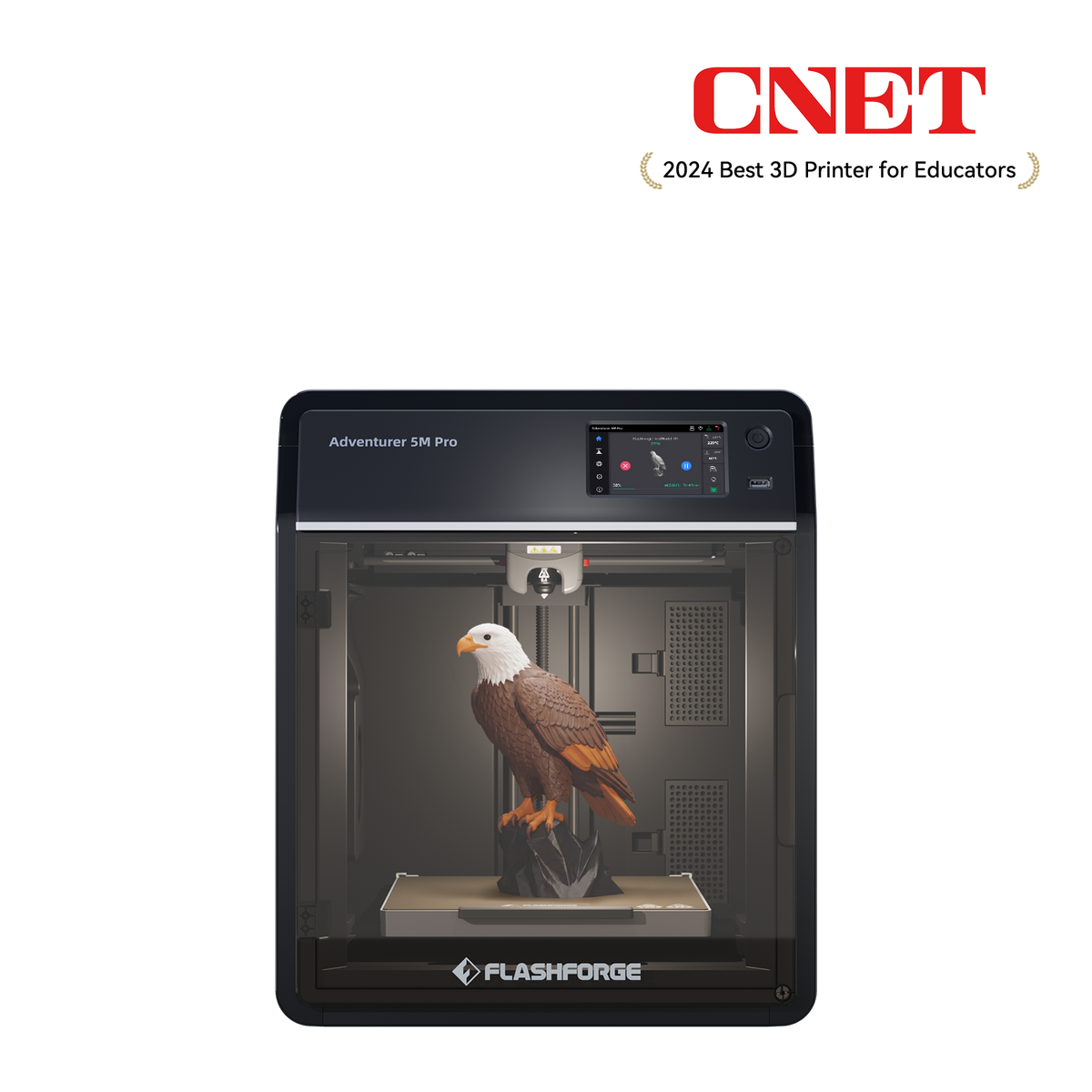
Enclosed CoreXY 220 mm cube printer with HEPA and carbon filtration, camera and ABS/ASA support
$379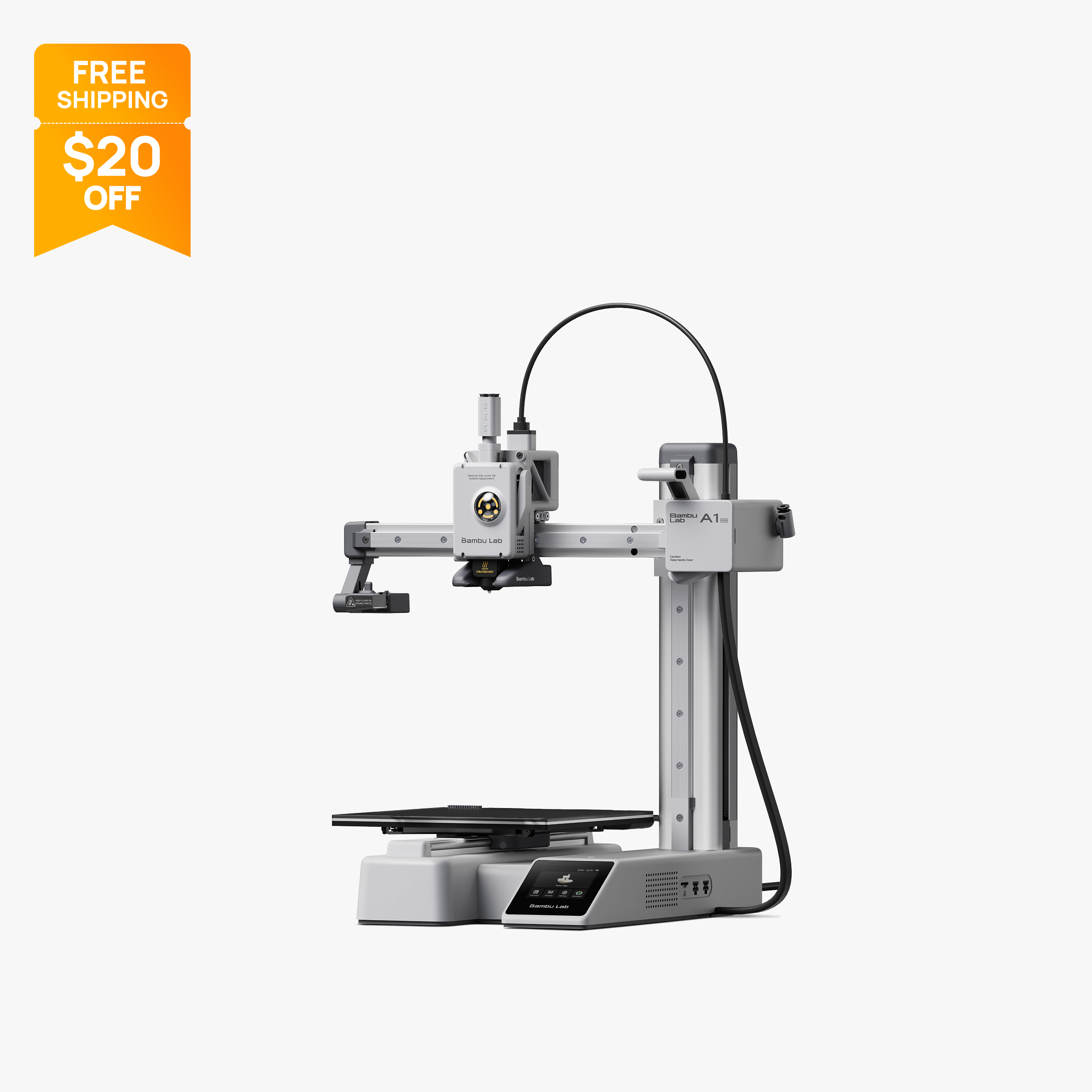
Compact 180 mm open-frame printer with 500 mm/s motion, 300 °C hot end and optional AMS Lite.
$199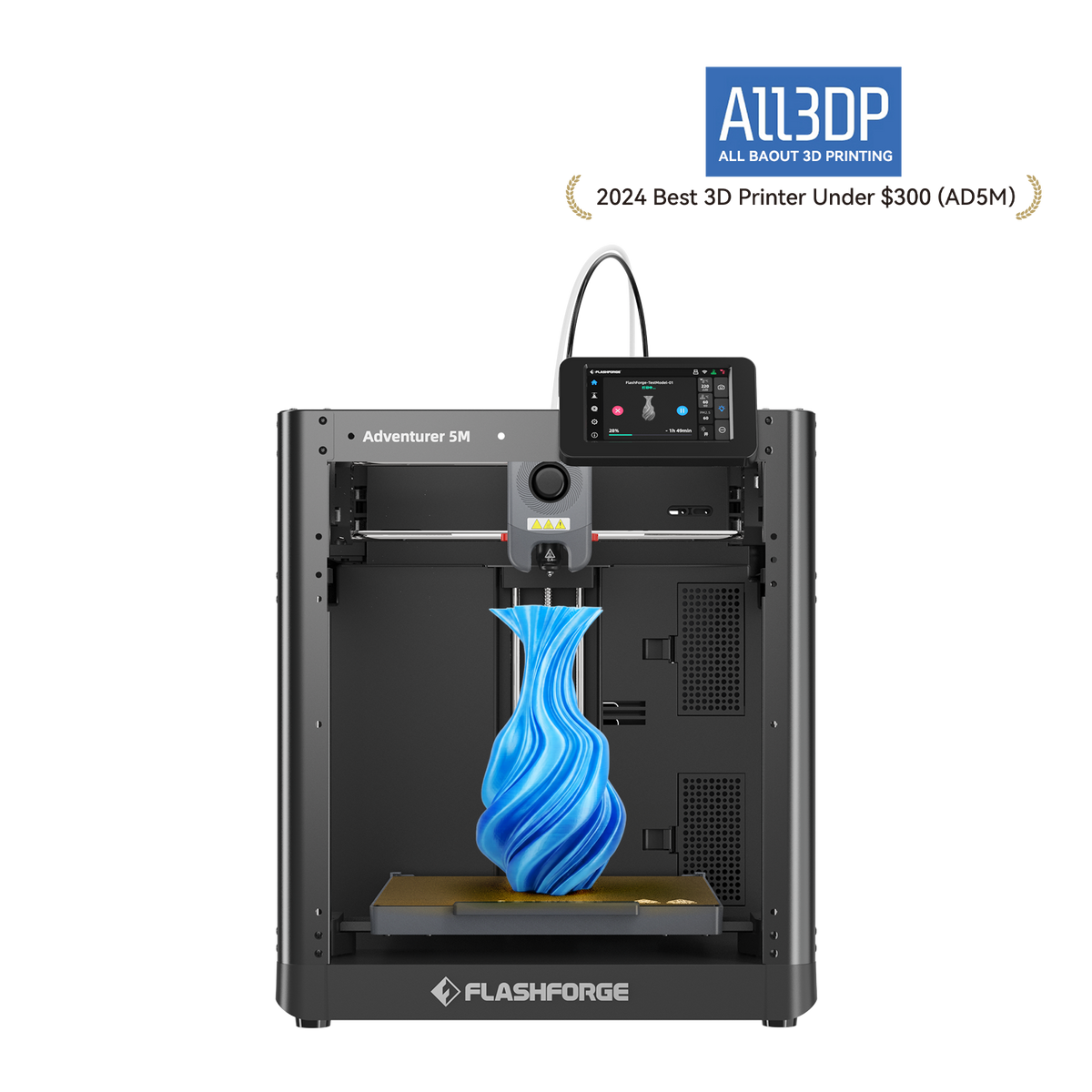
Budget open-frame 220 mm cube printer with auto-leveling, quick-swap nozzles and Wi-Fi
$249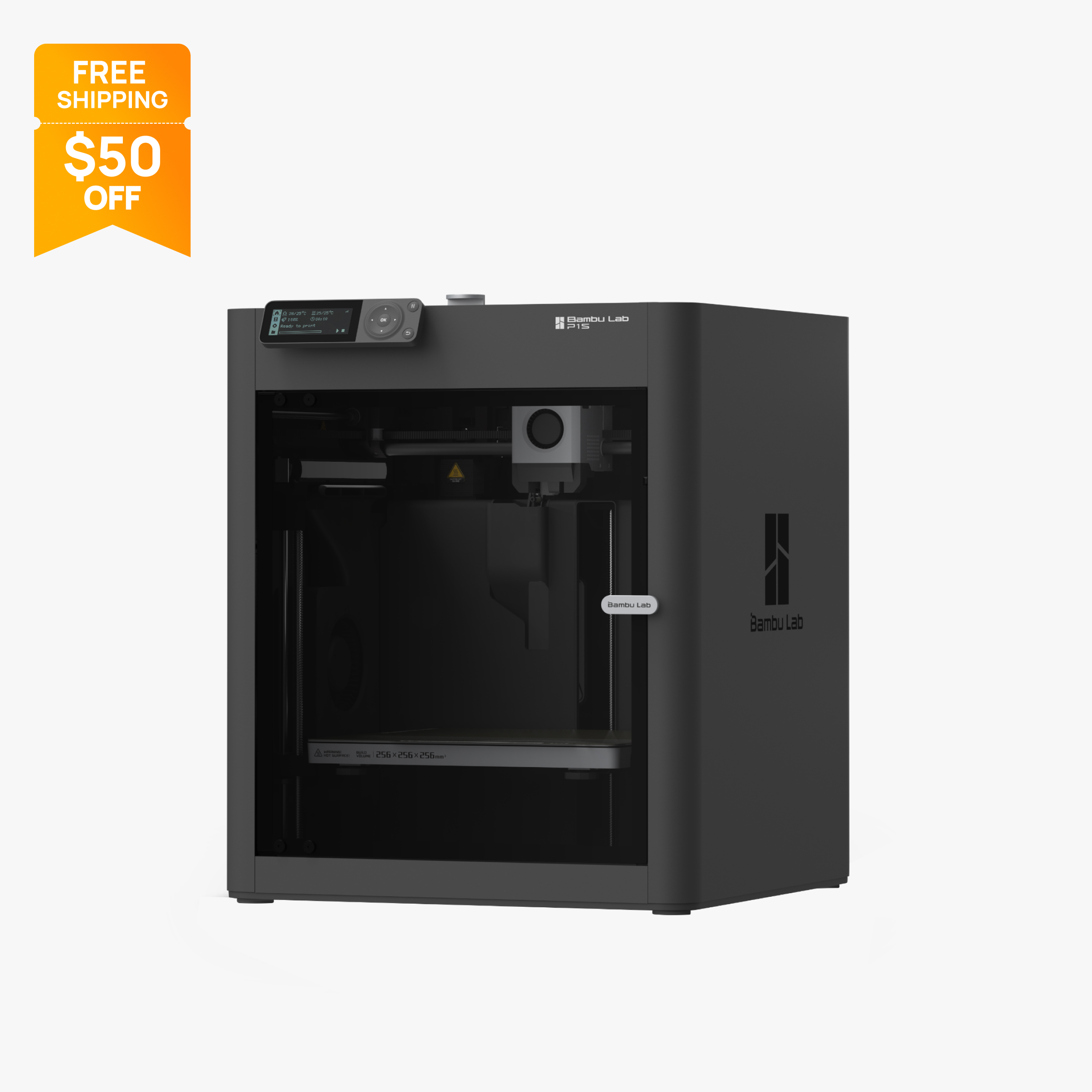
Enclosed 256 mm CoreXY printer with carbon filter, 20,000 mm/s² acceleration and AMS support.
$349
Comparison table
| Spec | Toybox Alpha Four | Flashforge Adventurer 5M Pro | Bambu Lab A1 Mini | Flashforge Adventurer 5M | Bambu Lab P1S |
|---|---|---|---|---|---|
| Type | FDM | FDM | FDM | FDM | FDM |
| Price | $299 | $379 | $199 | $249 | $349 |
| Build volume | 75×80×90 mm | 220×220×220 mm | 180×180×180 mm | 220×220×220 mm | 256×256×256 mm |
| Max speed | 60 mm/s | 600 mm/s | 500 mm/s | 600 mm/s | 500 mm/s |
| Multicolor | No | No | Yes (AMS Lite (optional, up to 4 colors)) | No | Yes (AMS or AMS 2 Pro (optional, up to 16 colors with 4 units)) |
| Enclosed | No | Yes | No | No | Yes |
| Auto bed leveling | Yes | Yes | Yes | Yes | Yes |
| Connectivity | Wi-Fi 2.4 GHz, Toybox app (iOS, Android, web) | Wi-Fi, Ethernet, USB | Wi-Fi, Bambu-Bus, microSD | Wi-Fi, Ethernet, USB | Wi-Fi, Bluetooth, Bambu-Bus, microSD |
| Noise | Not listed | 55 dB | Not listed | Not listed | 48 dB |
| Release year | 2018 | 2023 | 2023 | 2023 | 2023 |
How we chose
Choosing a 3D printer for a child is mostly a safety and frustration question. We ranked these picks on facts the makers publish: whether hot parts are enclosed, nozzle and bed temperatures, whether there is a heated bed, air filtration, automatic shutdown, how much setup is needed, and app control. We also used the makers' own age guidance where they publish it, and the official price at the time of writing (October 2026). Every pick is based on manufacturer specs, help center articles and official store prices, not lab tests. No 3D printer is a toy, so read the supervision section before you buy. You can read more about how we work on our About Us page.
The picks
1. Toybox Alpha Four: best 3D printer for young kids
The Toybox Alpha Four is the only printer here designed specifically for children. Toybox's help center says the printer is designed to be accessible to children aged 6+, and adds that children will most likely need adult supervision for the initial Wi-Fi and printer setup. After that, kids pick toys from the Toybox app catalog, which lists more than 7,000 printable designs, and print them with one tap from iOS, Android or a web browser. No slicer or computer is needed.
Several design choices reduce risk. Toybox's comparison table lists no heated bed on the Alpha Four, so there is no hot plate to touch, and Toybox only sells PLA "Printer Food", which it describes as plant-based and PFAS and BPA-free. Automatic calibration and mesh bed leveling remove the fiddly setup that frustrates beginners, and older kids can still print their own STL, OBJ, G-code or 3MF files. Toybox does not publish the Alpha Four's nozzle temperature, so treat the nozzle as hot like any FDM printer.
The tradeoffs: the 75 x 80 x 90 mm build volume limits prints to small toys, it prints one color only, and there is no run-out detection. Some bundles depend on a paid Toybox Pro membership.
At the time of writing (October 2026), the Starter bundle is $299 on toybox.com (regular $435), and the Pro Saver bundle with a Toybox Pro membership is $249. See the Toybox printer specs.
2. Flashforge Adventurer 5M Pro: best enclosed printer for older kids and teens
The Flashforge Adventurer 5M Pro is the pick for families who want a full-size printer with the hot parts closed off. It is a fully enclosed CoreXY printer with a 220 x 220 x 220 mm build volume, a 280°C hotend and a 100°C bed, and the enclosure keeps both behind doors while printing. Flashforge adds HEPA and activated carbon filtration, a built-in camera, automatic shutdown, power loss recovery and filament run-out reminders. It also lists published noise figures of 50 dB in low-noise mode and 55 dB in standard mode.
Flashforge's own kids' buying guide suggests the 5M Pro for teens and calls it safe for home or classroom use because of its filtration. Full auto leveling, Wi-Fi control and a 4.3 in touchscreen make setup and daily use straightforward for a teen with a parent nearby.
The tradeoffs: it costs more than open-frame options, it prints one color, and the HEPA and carbon filters need replacing over time. An enclosure reduces accidental contact, but the nozzle is still very hot when the door is opened during or right after a print.
At the time of writing (October 2026), Flashforge's US store lists it at $379 on sale (regular $529). See the Flashforge Adventurer 5M Pro specs.
3. Bambu Lab A1 mini: best small printer for teens with a parent
The Bambu Lab A1 mini is compact (347 x 315 x 365 mm, 5.5 kg), automatically calibrated and controlled over Wi-Fi from Bambu Studio or the Bambu Handy app, which makes it one of the easiest general-purpose printers to start with. Bambu's store guidance calls it the easiest starting point for beginners and education. Its 180 x 180 x 180 mm volume is large enough for school projects, fidget toys and gifts, and the A1 mini Combo adds four-color printing.
Safety needs an honest note here. The A1 mini is open frame: its all-metal hotend reaches up to 300 °C and its bed up to 80 °C, and nothing stops a hand from reaching the moving bed or nozzle. It is a general-purpose printer rather than a product designed for children, so treat it as a parent-owned printer that a teen uses with supervision, not a child's toy.
At the time of writing (October 2026), the A1 mini is $199 on Bambu's US store (regular $219), and the A1 mini Combo is $299. See the Bambu Lab A1 mini specs or our A1 vs A1 mini comparison.
4. Flashforge Adventurer 5M: best budget printer for supervised kids
The Flashforge Adventurer 5M is the open-frame sibling of the 5M Pro, and Flashforge's kids' guide recommends it for ages 8 to 12 with close supervision. Its reasons are practical: full automatic leveling, a setup Flashforge puts at about 10 minutes or less, a filament run-out reminder and power loss recovery. It has a 220 x 220 x 220 mm build volume, a 280°C hotend, a 100°C bed, quick-detach nozzles and Wi-Fi, Ethernet and USB control.
For families, one useful limit is that Flashforge states ABS-series filaments are not compatible, which keeps the printer on PLA and PETG. The tradeoffs are the open frame, which leaves the nozzle and moving parts exposed, and the lack of a camera or filtration. A DIY enclosure kit is sold separately.
At the time of writing (October 2026), Flashforge's US store lists the 5M at $249 on sale (regular $399). If you want the hot parts closed off, the 5M Pro is the step up. See the Flashforge Adventurer 5M specs.
5. Bambu Lab P1S: best for teens ready for bigger projects
The Bambu Lab P1S suits teenagers who have outgrown a starter printer and want to design and print larger or tougher parts for robotics, school projects or cosplay. It is enclosed, with a plastic and glass enclosure, extra cooling fans and an activated carbon filter, and it has a 256 x 256 x 256 mm build volume. Bambu lists PLA, PETG, TPU, ABS and ASA among its ideal materials, and an optional AMS adds multicolor printing.
The enclosure keeps the 300 °C hotend and 100 °C bed behind a door during printing, and a chamber camera with the Bambu Handy app lets a parent check progress from another room. Like the A1 mini, it is a general-purpose printer, so treat it as a supervised family printer in a well-ventilated room rather than a child's own device. If your teen plans to print ABS or ASA, ventilation matters even more.
At the time of writing (October 2026), Bambu's US store lists the P1S at $349 on sale (regular $399). See the Bambu Lab P1S specs.
What to look for in a 3D printer for kids
Hot parts and how exposed they are. Every FDM printer melts plastic in a heated nozzle. Flashforge's guide warns that the nozzle can exceed 260°C and cause severe burns if touched. Enclosed printers such as the 5M Pro and P1S keep it behind a door; open-frame printers do not.
Whether there is a heated bed. A heated bed is another hot surface. The Toybox Alpha Four has none according to Toybox's comparison table, which is one reason it suits younger children. The other picks have beds that reach 80 to 100 °C.
Material limits. PLA is the simplest material for kids. Toybox only sells PLA, and the Adventurer 5M lists ABS-series filaments as incompatible. Printers that can run ABS and ASA give teens more options, but those materials call for good ventilation.
Filtration and ventilation. HEPA filters target particles and activated carbon targets odors and VOCs. The 5M Pro has both and the P1S lists a carbon filter. Filters help, but they do not replace a well-ventilated room.
Setup and app control. Auto leveling and app-based printing remove the steps that most often frustrate children. Toybox's one-tap catalog is the simplest; Bambu and Flashforge printers add slicer software that older kids can learn.
Skip resin for children. Resin printers produce fine detail, but liquid resin is a skin sensitizer and parts must be washed in solvents such as isopropyl alcohol, which is flammable. That workflow is better left to adults. See our best resin 3D printers if an adult in the house wants one.
Which pick fits which age
- Around 6 to 10 years old: the Toybox Alpha Four. It is the only pick designed for children, it has no heated bed, and the one-tap catalog avoids slicer software. An adult should still handle setup and stay nearby.
- Around 8 to 12 years old, with an adult who wants to learn too: the Adventurer 5M, which Flashforge itself recommends for this age group with close supervision, or the 5M Pro if you would rather have the hot parts enclosed.
- Teens learning design and engineering: the Adventurer 5M Pro or the A1 mini. Both run from an app and level themselves, which keeps the focus on designing rather than troubleshooting.
- Teens with bigger ambitions: the P1S, for its 256 mm build volume, enclosure and wider material list, as a supervised family printer.
Whatever you choose, plan where the printer will sit before it arrives. A stable table out of reach of younger siblings and pets, in a room with a window or other ventilation, solves many safety questions in advance.
Adult supervision: what the makers say
The makers' own guidance is the best guide to supervision. Toybox says its printer is designed for children aged 6+ but that adults will most likely need to help with setup. Flashforge's kids' guide says children under 11 generally need extensive supervision, that children aged 8 to 12 need constant, direct adult supervision during all stages of printing, and that children should never be left unattended while a printer is running. We could not find official Bambu Lab age guidance for the A1 mini or P1S, so apply Flashforge's supervision advice to those printers as well.
In practice, that means an adult should own the printer, handle setup and filament changes for younger children, stay nearby during prints, and teach kids to wait for the nozzle and bed to cool before touching a print. Flashforge also suggests washing hands after use and keeping food and drink away from the printer.
What changed this update
Toybox's original 2018 printer is no longer listed, and our Toybox entry now covers its current model, the Alpha Four. No other picks on this page were discontinued. If you are buying for a teen who is ready to learn the whole process, see our best 3D printers for beginners and best budget 3D printers.
Frequently asked questions
What is the best 3D printer for kids?
For children around 6 to 10, the Toybox Alpha Four is the best fit because Toybox designs it for ages 6+, it has no heated bed and it prints PLA from a one-tap app. For teens, an enclosed printer such as the Flashforge Adventurer 5M Pro keeps the hot nozzle behind a door. Both still need adult supervision.
What age is appropriate for a 3D printer?
Toybox says its printer is designed to be accessible to children aged 6+, with adult help for setup. Flashforge recommends extensive supervision for children under 11 and constant, direct supervision for ages 8 to 12. General-purpose printers such as Bambu Lab's are not designed as children's products, so treat them as adult-owned.
Are 3D printers safe for kids?
They can be used safely with supervision, but they are not toys. FDM nozzles get hot enough to cause severe burns, and moving parts can pinch fingers. Enclosed printers, PLA filament, good ventilation and an adult nearby reduce the risks.
Does the Toybox 3D printer have a heated bed?
No. Toybox's comparison table lists no heated bed for the Alpha Four, while its multicolor Luna model has one. Toybox does not publish the Alpha Four's nozzle temperature, so the nozzle should still be treated as hot.
Is PLA safe for kids to use?
PLA is the usual choice for children because it prints at lower temperatures than ABS and needs no enclosure. Toybox only sells PLA and describes it as plant-based and PFAS and BPA-free. Printing should still happen in a ventilated room, and kids should wash their hands after handling printers and filament.
Should kids use a resin 3D printer?
Resin printers are better left to adults. Liquid resin can cause skin allergies with repeated contact, and parts must be washed in solvents such as isopropyl alcohol, which is flammable. An FDM printer with PLA is the safer starting point for children.
Sources
- Toybox Alpha Four 3D printer page (official)
- Toybox Alpha Four Starter bundle (official store)
- Toybox help center: What age group is the Toybox made for?
- Flashforge Adventurer 5M Pro product page (official US store)
- Flashforge Adventurer 5M product page (official US store)
- Flashforge: 2025 best 3D printers for kids (official blog)
- Bambu Lab A1 mini tech specs (official)
- Bambu Lab A1 mini on the official US store (price)
- Bambu Lab P1S on the official US store (price, parameters, FAQ)
- Formlabs: Resin 3D printing safety FAQ
- Formlabs support: Introduction to isopropyl alcohol (IPA)