Prusa Research
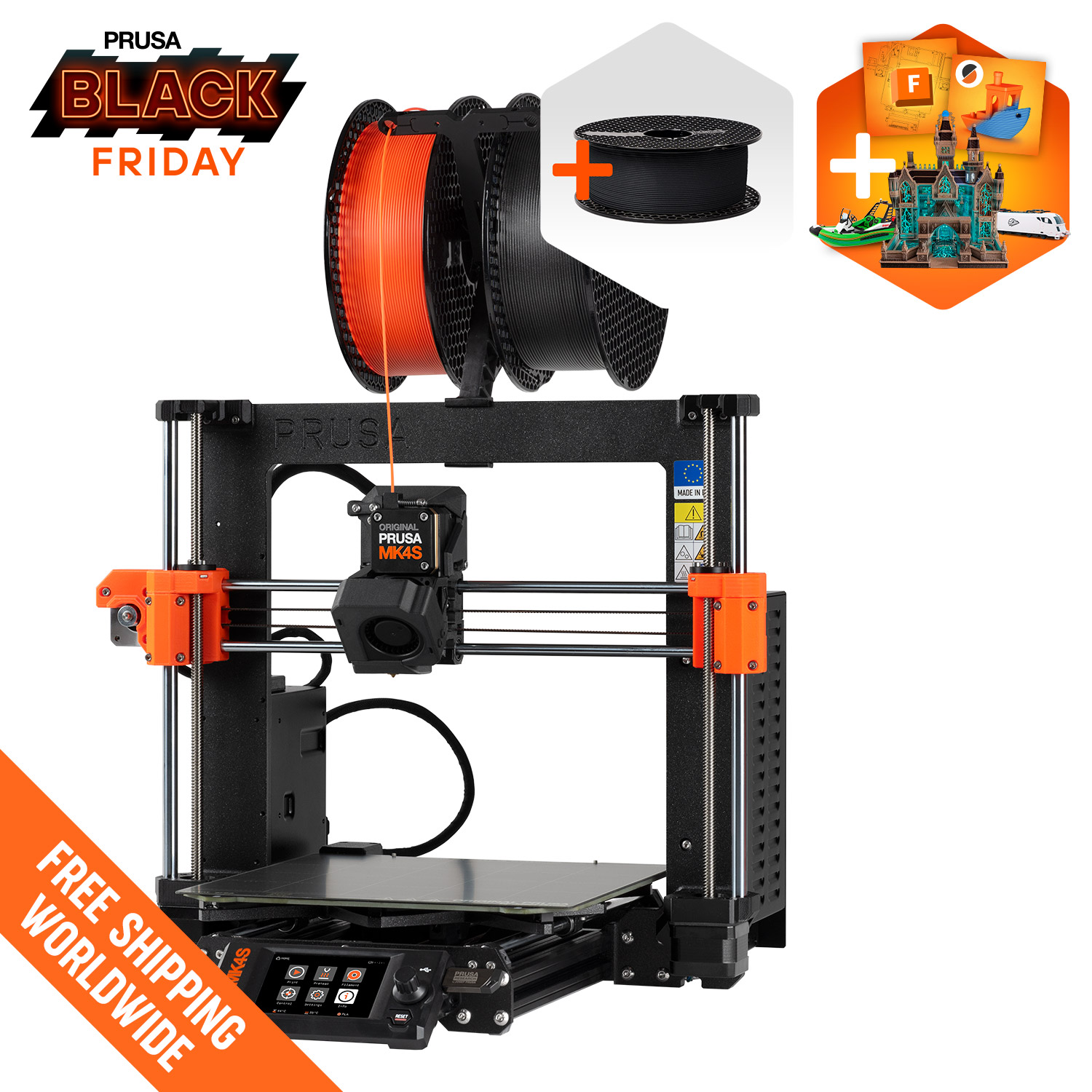
Prusa MK4S
Open-frame Prusa bedslinger with a 250 x 210 x 220 mm build, load-cell sensing and optional MMU3
$925Price checked October 28, 2026
Best for PLA and PETG everyday printingBest for Schools and makerspacesBest for Kit builders and tinkerersBest for Buyers who want long-term parts support
Overview
The Original Prusa MK4S is an open-frame printer with a 250 x 210 x 220 mm build volume, a 290 °C high-flow hotend and a 120 °C bed. It ships with a Wi-Fi module and Ethernet, and the optional MMU3 adds up to five filaments.
What it is
The Original Prusa MK4S is Prusa Research's open-frame bed-slinger printer and the refined version of the MK4. Prusa sells it both fully assembled and as a kit, and it remains listed as in stock on the US store. Its product page describes improved print speed over the MK4 and promotes the enclosed CORE One as a step up, but it does not name a replacement for the MK4S.
Key specs that matter
- Build volume: 250 x 210 x 220 mm, a common size for desktop printers that fits most household and hobby parts.
- Hotend: a 0.4 mm high-flow Prusa Nozzle (brass CHT) rated to 290 °C.
- Bed: heated to a maximum of 120 °C.
- Sensors: load-cell sensing, a filament sensor and four thermistors. The load cell is used for automatic bed probing.
- Layer height: 0.05 to 0.30 mm.
- Screen: 3.5 inch color graphic display.
- Connectivity: an ESP Wi-Fi module delivered with the printer, Ethernet, USB drive, NFC and Prusa Connect.
- Multi-material: optional MMU3 for up to five colors or materials, with filament changes Prusa quotes at 25 to 35 seconds each.
- Speed: Prusa does not publish a numeric maximum speed or acceleration for the MK4S.
Who it suits
The MK4S is aimed at buyers who value reliability, documentation and long-term support over the newest CoreXY speed figures. Prusa's open firmware, PrusaSlicer, printable spare parts and detailed help guides make it a common choice for schools, makerspaces and people who want to repair their own machine. The kit version suits hobbyists who want to understand how their printer works and are happy to spend an afternoon or more assembling it.
Because the frame is open, it is best suited to PLA, PETG, TPU and similar materials that do not need a warm chamber.
What to know before buying
There is no enclosure in the base package. ABS and ASA can warp or crack without one, so plan on Prusa's separate enclosure or choose the enclosed CORE One if those materials matter to you.
Pricing on prusa3d.com was inconsistent when checked: the product page showed $925 assembled and $657.40 for the kit, while a comparison table listed $999 and $729. Treat the lower numbers as current pricing that may change, and confirm the total in the cart.
The MMU3 is sold separately or as an MK4S/MMU3 bundle. Prusa recommends the standard nozzle with the MMU3, and the bundle includes both the standard and high-flow nozzles. Buyers moving to an enclosure later can also look at Prusa's MK4S to CORE One+ (Gen 2) conversion kit.
Finally, compare the MK4S with the CORE One before ordering. The CORE One costs more but adds an enclosure, a taller 270 mm Z axis and active chamber heating, which may save the cost of a separate enclosure if you expect to print warp-prone materials.
Specifications
| Type | FDM |
|---|---|
| Price | $925 |
| Build volume | 250×210×220 mm |
| Max speed | 200 mm/s |
| Multicolor | Yes (MMU3 (optional, up to 5 colors/materials)) |
| Enclosed | No |
| Auto bed leveling | Yes |
| Connectivity | Wi-Fi (ESP module included), Ethernet, USB drive, NFC, Prusa Connect |
| Noise | Not listed |
| Release year | 2024 |
Pros and cons
Pros
- The load-cell sensor handles automatic bed probing, so first layers do not depend on manual Z-offset tuning.
- Sold as an assembled printer or a cheaper kit, giving buyers a choice between convenience and price.
- Wi-Fi module, Ethernet and USB are all included, which covers both home networks and wired workshop setups.
- Optional MMU3 adds up to five colors or materials without replacing the printer.
- Open firmware, PrusaSlicer and printable spare parts make long-term repair and upgrades straightforward.
- A 120 °C bed and 290 °C hotend cover PLA, PETG, TPU and many filled filaments.
Cons
- No enclosure in the base package, so ABS and ASA are hard to print well without buying one.
- Prusa publishes no numeric speed or acceleration figures, which makes direct speed comparisons difficult.
- The bed-slinger design moves the print on the Y axis, which limits speed compared with CoreXY machines.
- The 220 mm build height is shorter than the CORE One and many similarly priced CoreXY printers.
- Multi-color printing needs the separately sold MMU3, which adds cost and setup work.
Frequently asked questions
Does the Prusa MK4S need assembly?
Only if you buy the kit. Prusa sells an assembled MK4S ($925 on the US store when checked) and a kit ($657.40) that you build yourself using Prusa's printed guide.
Can the MK4S print ABS?
It can reach the needed temperatures (290 °C nozzle, 120 °C bed), but it has no enclosure in the base package. ABS tends to warp and crack in open air, so an enclosure is strongly advisable.
Does the MK4S have Wi-Fi?
Yes. The product page says an ESP Wi-Fi module is delivered with the printer, and Ethernet, USB drive and NFC are also supported.
Can the MK4S print in multiple colors?
Yes, with the optional MMU3, which supports up to five colors or materials. It is sold separately or in an MK4S/MMU3 bundle.
Can I upgrade an MK4S to an enclosed printer later?
Prusa sells an MK4S to CORE One+ (Gen 2) conversion kit, and also offers a separate enclosure for open-frame Prusa printers.
Sources
Verdict
Buy the MK4S if you want a well-documented, repairable open-frame printer with strong official support and an optional multi-material upgrade. Look elsewhere if you need an enclosure for ABS or ASA, or want the highest published speeds for the money.
Featured in
Related printers