Creality
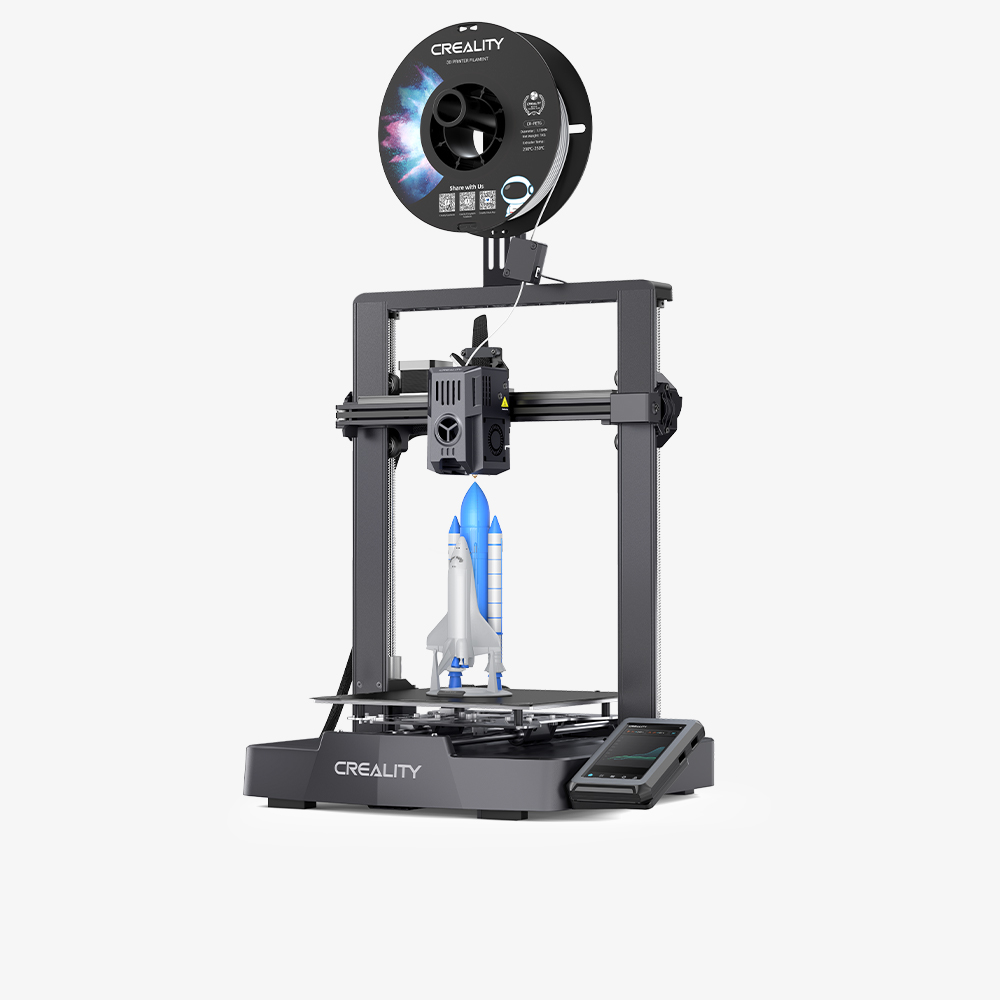
Creality Ender 3 V3 KE
Cartesian Ender rated at 500 mm/s and 8,000 mm/s2, with a 300 C Sprite extruder, Wi-Fi and a touchscreen.
Best for Beginners wanting Wi-Fi printingBest for Budget PLA and PETG printingBest for Learning on a simple Cartesian designBest for Classroom or club printers
Overview
The Ender-3 V3 KE is an open-frame Cartesian printer rated up to 500 mm/s with 8,000 mm/s2 acceleration. It prints 220 x 220 x 240 mm, reaches 300 C at the nozzle and 100 C at the bed, and adds Wi-Fi, auto leveling and a touchscreen.
What it is
The Ender-3 V3 KE is a Cartesian, open-frame FDM printer that Creality released in September 2023. It sits between the entry-level Ender-3 V3 SE and the faster CoreXZ Ender-3 V3. It keeps the familiar bed slinger layout but adds a Klipper-style faster motion profile, an X-axis linear rail, a 300 C "Sprite" direct extruder, Wi-Fi and a touchscreen.
Key specs that matter
- Build volume: 220 x 220 x 240 mm, 10 mm shorter in Z than the V3 and V3 SE.
- Speed and acceleration: up to 500 mm/s and 8,000 mm/s2 per Creality, with a typical speed of 300 mm/s.
- Temperatures: nozzle up to 300 C, heated bed up to 100 C.
- Materials: Creality lists Hyper PLA, PETG, ABS, TPU (95A) and ASA.
- Leveling: automatic leveling and Z-offset through a one-tap self-test.
- Connectivity: Wi-Fi, LAN and cloud printing through Creality Print or the Creality Cloud app, plus USB drive. It has 8 GB of onboard storage and supports over-the-air firmware updates.
- Screen: 4.3 in color touchscreen with model preview.
- Accuracy: plus or minus 0.1 mm per Creality's comparison table.
Who it suits
The KE suits beginners and hobbyists who want more speed and network features than the V3 SE without moving to a CoreXY or CoreXZ machine. Its open Cartesian design is easy to understand and service, and the 300 C hotend gives more material headroom than the SE's 260 C. It also works well in classrooms and maker clubs, where Wi-Fi job sending and a touchscreen with model preview make it easier for several people to share one printer. Creality also includes automatic filament loading, which helps newer users change spools without fumbling with the extruder.
What to know before buying
- Availability is unclear. Creality's own product page still shows the KE with a buy button, but the official US store page shows no price, and the KE is no longer listed in the store's 3D printer collection. Check stock before relying on it. Creality now promotes the Ender-3 V4 as its next-generation Ender.
- Open frame. Although ABS and ASA are on the supported materials list, an open printer exposes those materials to drafts and temperature swings that cause warping and layer splitting. An enclosure helps.
- Bed slinger limits. Because the bed moves in Y, tall or heavy prints can wobble at high acceleration, so the 500 mm/s rating is best treated as a ceiling, not a typical speed.
- Single color only. There is no multicolor unit.
- Spec sheets differ on file transfer. Creality's comparison blog lists SD card and WLAN, while its product and support pages list USB drive and Wi-Fi. Confirm the ports on the unit you buy if that matters.
Specifications
| Type | FDM |
|---|---|
| Price | Check current price |
| Build volume | 220×220×240 mm |
| Max speed | 500 mm/s |
| Multicolor | No |
| Enclosed | No |
| Auto bed leveling | Yes |
| Connectivity | Wi-Fi, USB drive, Creality Cloud |
| Noise | Not listed |
| Release year | 2023 |
Pros and cons
Pros
- Creality rates it at up to 500 mm/s with 8,000 mm/s2 acceleration, much faster than the V3 SE's 250 mm/s.
- The 300 C Sprite direct extruder handles PLA, PETG, TPU 95A, ABS and ASA per Creality's materials list.
- Wi-Fi, LAN and Creality Cloud printing let you send and monitor jobs from a computer or phone.
- A one-tap self-test handles automatic leveling and Z-offset, which simplifies first-time setup.
- The 4.3 in touchscreen with model preview is easier to use than the knob screen on the V3 SE.
- An X-axis linear rail and plus or minus 0.1 mm listed accuracy support consistent everyday prints.
Cons
- The official US store page shows no price and the KE is missing from the store's printer collection.
- There is no enclosure, so ABS and ASA prints are prone to warping without adding one.
- The 240 mm Z height is 10 mm shorter than the Ender-3 V3 and V3 SE.
- As a Cartesian bed slinger, tall prints can wobble at high acceleration, limiting real-world speed.
- There is no multicolor system, so color changes require manual filament swaps.
- There is no built-in camera, so remote monitoring needs a third-party webcam setup.
Frequently asked questions
Is the Ender-3 V3 KE still available?
Creality's product page still lists it, but the official US store page shows no price and the KE no longer appears in the store's printer collection. Check stock before planning around it.
Can the Ender-3 V3 KE print ABS and ASA?
Creality lists ABS and ASA as supported, and the nozzle reaches 300 C with a 100 C bed. The printer is open, so an enclosure is recommended to reduce warping with those materials.
What is the difference between the V3 KE and V3 SE?
The KE is rated at 500 mm/s and 8,000 mm/s2 versus 250 mm/s and 2,500 mm/s2 for the SE. It also has a 300 C nozzle instead of 260 C, Wi-Fi and a 4.3 in touchscreen instead of a 3.2 in knob screen.
Does it need assembly?
Some assembly is required. Creality describes it as quick assembly followed by a one-tap self-test that handles leveling and Z-offset.
Does it work with third-party filament?
Yes. It uses standard 1.75 mm filament from a spool, so any brand that suits the temperature range should work, though you may need to tune slicer profiles.
Sources
- Creality Ender-3 V3 KE product page (official)
- Creality Ender-3 V3 KE support and specifications (official)
- Creality US store, Ender-3 V3 KE page (official)
- Creality store blog: Ender-3 V3 vs V3 SE vs V3 KE spec comparison (official)
- Creality US store, 3D printers collection (official)
- Creality Ender-3 V4 product page (official)
Verdict
The Ender-3 V3 KE fits buyers who want a simple open-frame printer with Wi-Fi, a touchscreen and a 300 C hotend at a modest price. If you cannot find it in stock, or want an enclosure, camera or multicolor, look at the Ender-3 V3 SE, K1C or K2 series instead.
Related printers